What Is a Database? A Plain-English Guide for App Builders
Tables, rows and columns explained with one real order, why apps do not just use a file, and how to plan your data before your screens.
What is a database?
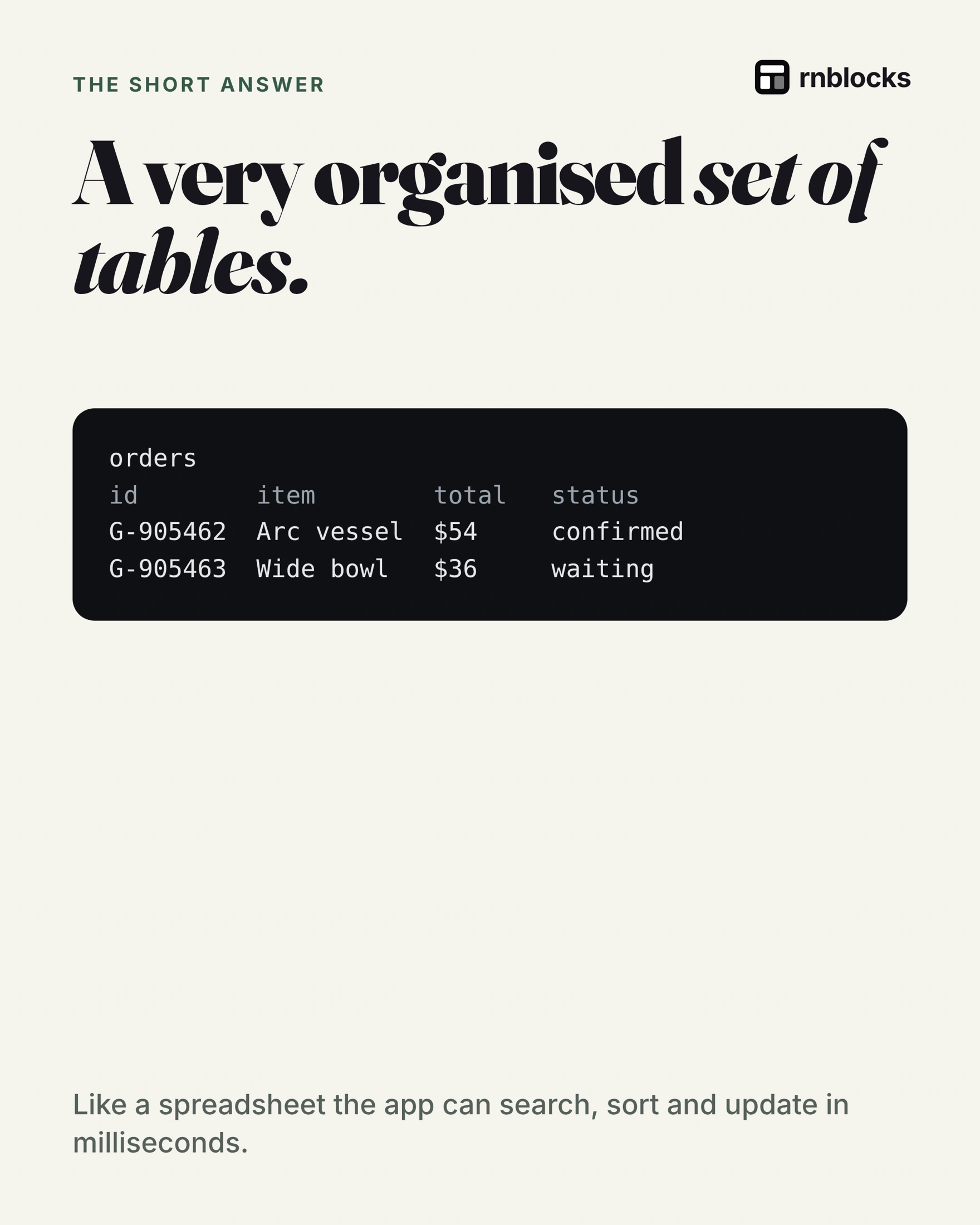
A database stores information in a structured form so an app can find and change the records it needs. A relational database organizes records into tables, with rules for how they relate. Each table holds one kind of thing (orders, users, articles), each row is one of them, and each column is one detail.
One example
orders
id        item        total   status
G-905462  Arc vessel  $54     confirmed
G-905463  Wide bowl   $36     waiting
- Table:
orders - Row: a single order, G-905462
- Column: a detail such as
totalorstatus
A screen can read the records it needs from it. An order confirmation screen finds one row and shows its columns: item, total, delivery address.
Why not just a file?
- Fast search: find one order among millions.
- Many people at once: transactions and concurrency controls help coordinate changes.
- Rules built in: you can configure required values, relationships and access rules.
Two places a database can live
| On the phone | On a server | |
|---|---|---|
| Example | SQLite | Postgres (used by Supabase) |
| Good for | Personal, offline data | Shared and synced data |
Plan your tables before your screens
- What things does the app store? Each one is a table.
- What details does each need? Each one is a column.
- Who can see which rows? Decide this early. In Postgres this is done with row level security.
Give each record an identity
Two customers can order the same item for the same price. A database still needs to distinguish their orders. That is why records have identifiers, rather than using a product name as the only way to find them.
For a small shop, separate products, customers and orders. An order refers to the customer who placed it. Its line items record what was bought and the price at purchase. Changing today's catalog price should not rewrite yesterday's receipt.
You do not need to design every possible report before building, but these relationships prevent confusion later.
Constraints protect the meaning of data
A database can reject an order missing a customer reference or a booking that duplicates a unique reservation. Those checks must be configured. A database is not automatically protected from bad or conflicting writes just because it is more powerful than a spreadsheet.
The same applies to privacy. The interface might show only your orders, but the backend must enforce that rule when someone requests data directly. Filtering a list on the phone is not an access-control system.
Think about complete actions
A purchase can change several records: an order, its items and available stock. If only half the changes succeed, the app can end up showing an order without the right inventory update.
Databases support transactions to group related changes so they succeed or fail together. External services such as payment processors add another boundary, so the application also needs a plan to reconcile their results. The useful principle is to define the whole action, not merely each screen.
A beginner's data sketch
Write one sample record for each important thing. For a class-booking app, that might be a class, a member and a reservation. Next to each field, ask whether it is required, who may change it and whether it should ever be public.
| Question | Example decision |
|---|---|
| What belongs to a member? | Their reservations and private contact details |
| What is shared? | Class name, time and remaining places |
| What must stay unique? | One active reservation per member and class |
| What happens on deletion? | Remove personal data while retaining required records appropriately |
Keep test data separate from live records
Use realistic sample names and dates, but do not paste customer information into a prompt or public screenshot. Before changing a live database, understand what will be altered and how you would recover if a mistake occurred.
A successful screen preview does not prove that backups, permissions or saving behavior are correct. Test those parts directly with representative accounts and data.
Does every screen need its own table?
No. Screens are ways of displaying information; tables describe the information itself. A member profile, booking history and upcoming-class view can draw from related records. Creating a separate copy for every screen can make updates inconsistent.
When do files belong somewhere else?
A database often stores a file's name, owner and storage reference while a file-storage service holds the photo or recording. Decide permissions for both. A private database row does not help if the image it points to is publicly accessible against your intended design.
What should I ask before changing the structure?
Ask which existing records are affected, whether the change preserves them and how the app will handle older data. A new required field may be empty on records created before the change. Test that case instead of checking only a fresh account.
How much design is enough at the start?
Model the records needed for the main task and write a few realistic examples. Include ownership and important relationships. Leave room to evolve, but do not skip rules that prevent private information being exposed or a consequential action being recorded incorrectly.
Check an existing record
When the structure changes, reopen a record created before the change. Older information can expose missing-field assumptions that a freshly created example never reveals. Keep that case in your regular app checks.
Build it with RNBlocks
RNBlocks can help turn a plain-language data requirement into an app connected to Supabase. Say what each person should save and what must stay private. Review the proposed setup and verify it through the app before expanding the data model.
Ready to build?
Build, connect and publish iOS and Android apps with AI.