How Do Push Notifications Work on iPhone and Android?
The relay from your server through Apple and Google to the lock screen, what a device token is, and how to send notifications people keep on.
How does a push notification reach a phone?
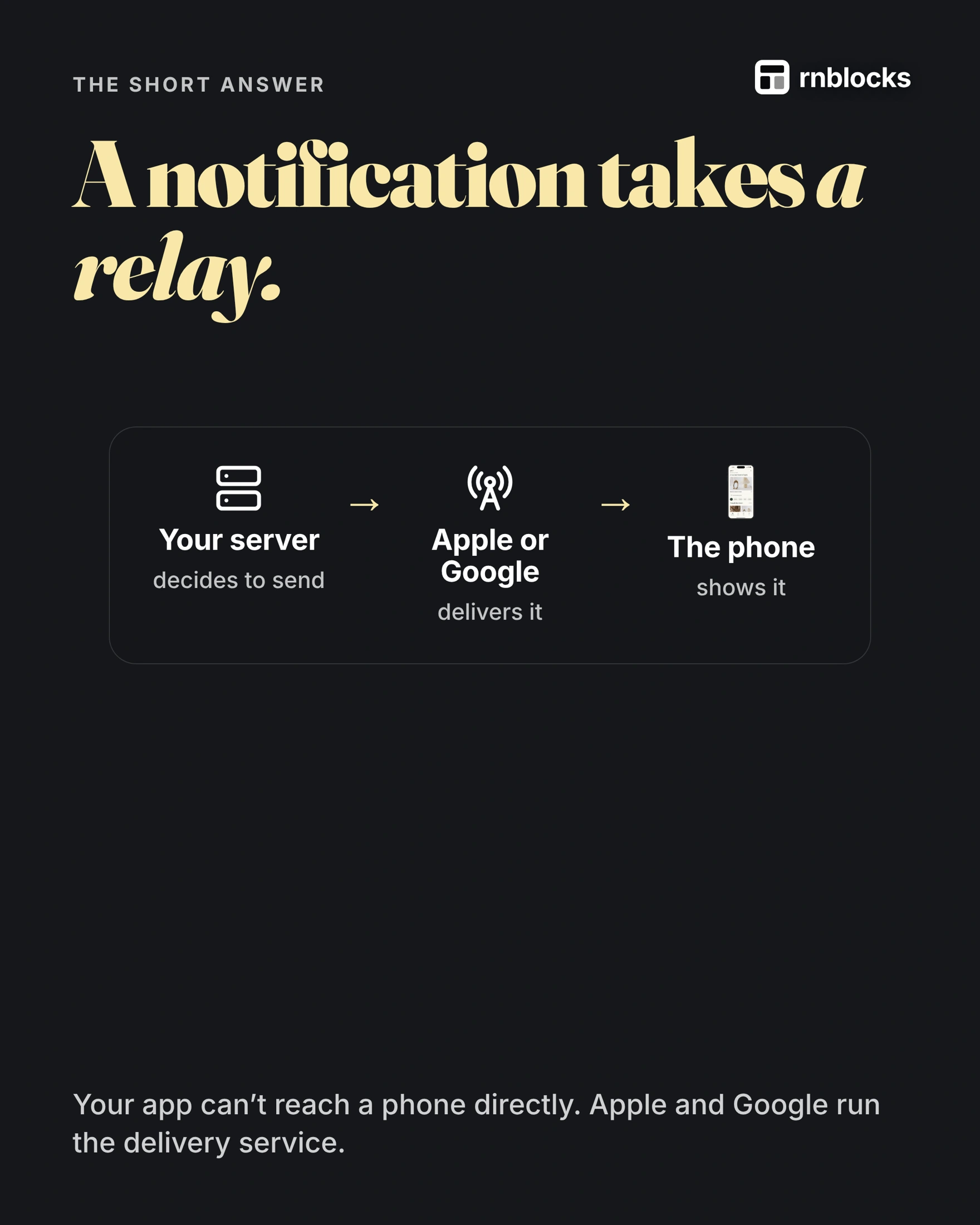
Through a relay. Your server decides to send a message, Apple or Google delivers it, and the phone shows it. Your app cannot reach a phone directly: Apple runs APNs (Apple Push Notification service) and Google runs FCM (Firebase Cloud Messaging). Tools such as Expo's push service can send to both through one API.
Step one: the phone says yes
- Permission: the person allows notifications.
- A device token: the phone gets an address for this phone and this app.
- Saved on your server: so you know where to send.
Step two: sending
Your server sends the message and the token to APNs or FCM (or to a service like Expo that forwards it). The phone shows it, even when your app is closed.
Let people choose what they get
A clear setting, such as "Updates about new collections", lets people turn one topic on or off. Put it where they will look for it.
Useful, or muted
- "Your order has shipped." is expected, timely and about them.
- "We miss you!" sent too often gets switched off.
Before you send one
- Did they ask for it? Tie it to an action or a setting.
- Is it about them? Their order, their message, their reminder.
- Can it wait? Group small updates instead of buzzing every hour.
For a technical walkthrough, see push notifications with Expo and Supabase Edge Functions.
Local reminders and remote pushes are different
A local notification is scheduled on the device, such as a timer finishing. A remote push starts outside the phone, such as a message announcing that a delivery status changed. You may need one, both or neither.
A daily habit reminder can often be scheduled locally. A booking cancellation from another person needs an external signal. Choosing the right type can reduce backend work and avoid unnecessary requests.
Follow a remote notification
The app requests permission and obtains a push token through the chosen service. Your backend associates that token with the appropriate account or installation. When a relevant event occurs, it sends a notification through the delivery service, which reaches Apple's or Google's notification infrastructure.
Tokens can change, devices can be replaced and permission can be withdrawn. A backend should clean up invalid destinations and avoid continuing to send a former user's private notifications after account switching.
A notification is not a guaranteed message receipt
The device may be offline, notifications may be muted or the operating system may delay delivery. A push-service acceptance response does not mean the person saw the message.
Keep important information in the app itself. A canceled appointment should appear as canceled when the person opens their schedule, even if the notification never arrived.
Make the tap useful
Tapping 'Your class time changed' should open the relevant class or explain why it is no longer available. Sending everyone to the home screen forces them to hunt for the information.
Test the app open, backgrounded and fully closed. Also try a signed-out user and an item that has been deleted. Deep linking and authentication can behave differently in each case.
Test with the right build
Expo Go is not an appropriate way to prove a production push setup. Use a development or release build with the required native configuration and provider credentials. In particular, remote push support was removed from Expo Go on Android starting with SDK 53.
Test on the actual platforms you plan to support. Confirm permission, token registration, delivery handling and the screen opened after tapping. Avoid putting sensitive health, financial or private message details on a lock screen by default.
Send fewer, more relevant messages
Let people choose useful categories and turn them off. A reminder tied to a task they requested is different from an unrelated daily promotion. Measure whether the notification helps complete the task, not only how many you sent.
Can a notification contain private information?
It can, but consider what appears on the lock screen and what the person expects. A generic 'You have a new message' may be more appropriate than exposing a sensitive message preview. Provide controls that fit the product.
Does a delivery receipt prove someone read it?
No. A provider accepting or delivering a notification is different from the person seeing, opening or acting on it. Use the appropriate signal for the question you are measuring and avoid claiming a read from a send result.
Should I send to every token saved for an account?
Only according to the intended device and account behavior. Remove invalid tokens, handle logout and consider whether multiple devices should all receive the same alert. A reused phone should not keep receiving another person's updates.
Can I use notifications to fix poor retention?
They can remind people of a useful task, but repeated irrelevant messages can make the product less appealing. First understand whether the task is valuable and when it recurs. Let people choose the reminders they want.
What should I test before launch?
Send a sample event to a fresh installation, with permission allowed and refused. Test tapping while the app is open, closed and signed out. Confirm that the underlying information is correct in the app even when no notification is shown.
Build it with RNBlocks
In RNBlocks, define the event a notification should announce and the screen it should open. Ask our agent for the appropriate app behavior, then test using a suitable installed build. A useful reminder should help people continue a task, not simply increase the number of messages sent.
Ready to build?
Build, connect and publish iOS and Android apps with AI.