Google Play Declined My Production Access. What Do I Do Next?
Why new personal Google Play accounts need a closed test before production, why applications get declined, and how to prepare a stronger second attempt.
What do I do if Google Play declines production access?
Read the reason Google gives, fix what it points to, and keep your closed test running with real, active testers before applying again. For personal developer accounts created after November 13, 2023, Google requires at least 12 testers opted in continuously for 14 days in a closed test before you can apply for production. Meeting that number only lets you apply; Google also looks at whether testing was genuine and whether the app is ready.
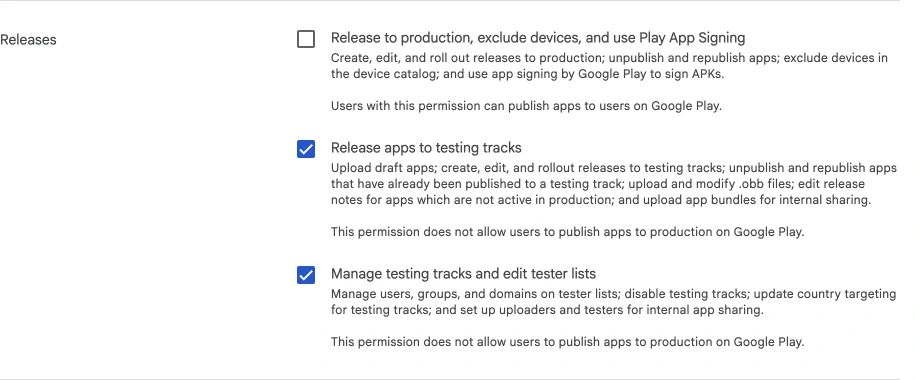
Why the rule exists
Google introduced the requirement to reduce low-quality and abandoned apps from new accounts. Organization accounts are not subject to the same threshold.
Common reasons applications are declined
- Too little real testing: testers opted in but never opened the app, or engagement dropped after day one.
- Thin answers in the application form: Google asks how you recruited testers, what feedback you received and what you changed. Vague answers weaken the application.
- The app is not ready: crashes, placeholder content, broken sign-in or missing policy items.
- Policy gaps: missing privacy policy, incomplete Data safety form or no account deletion option for apps with accounts.
How to prepare a second attempt
- Recruit testers who will use it: friends who fit the audience, a small community, or other developers doing the same test. Give each one a real task to try.
- Collect and act on feedback: keep a short log of what testers reported and the fixes you shipped as new test builds.
- Ship fixes when testing reveals a problem: record the feedback and repeat the affected task.
- Answer the form specifically: name the problems testers found and what you changed.
- Check policy items: privacy policy URL, Data safety answers, content rating and target audience.
Common mistakes
- Restarting the 14-day count by removing and re-adding testers.
- Adding emails to the list but never sharing the opt-in link. Adding an email is not an invitation.
- Applying the same day the 14 days end without any changes or feedback to report.
Separate production access from an app review rejection
Google Play can stop a release at different stages. A production-access decision concerns whether an eligible new personal developer account can move beyond testing. A policy rejection concerns the app, listing or declaration that Google reviewed. An upload failure can happen before either.
Write down the screen where the decision appears and the exact message. If it is an account testing requirement, changing your description alone will not satisfy it. If it concerns a permission or privacy disclosure, adding more testers will not fix that issue. Work on the specific decision Google made.
Give testers a reason to return
For a meal-planning app, a useful test is more than opening the home screen. Ask people to create a three-day plan, replace one meal, save a shopping list and return the next day to use it. The tasks should match normal use, rather than manufacturing meaningless taps.
Recruit a little more than the minimum number so one person losing access does not leave the test short. Confirm the Google account they used to join the test is the one active in Google Play. Share both the opt-in instructions and a brief explanation of what to try. Never collect someone's Google password.
A person appearing in your email list does not prove they joined successfully. Ask them to confirm that the opt-in page worked and the app installed. Keep any testing notes private and collect only information you need.
Keep a small evidence log
| What to record | Useful example |
|---|---|
| Task | Create a meal plan and replace dinner |
| Problem | Replace button hidden by the keyboard |
| Fix | Form scrolls and keeps the action reachable |
| Retest | Tester completed replacement in the next build |
This makes the production application easier to answer honestly. It also helps you decide what to improve. Do not invent feedback, claim usage you did not observe or buy a promise of approval.
An update is useful when testing exposes a real issue. It is not a universal requirement to ship a cosmetic update simply to appear active. If testers find no bugs, describe the journeys they tried and what you learned about readiness.
Answer the application with specifics
Explain who the testers were, how you recruited them, what parts of the app they used and what feedback affected the product. 'They liked it' gives little information. 'Three testers could not find saved shopping lists, so we added a persistent list tab and asked them to repeat the task' explains a meaningful test.
If Google asks you to continue testing, follow the instructions shown for your account. The minimum opt-in period is a threshold to apply, not a guarantee of approval or a promise that no further testing will be requested.
Before applying again
Install the latest test build as a new user. Check onboarding, sign-in, the core task and account deletion where required. Confirm your listing contains no placeholder images and your support and privacy pages open publicly.
Then compare the app's data behavior with the Data safety answers. A newly added analytics SDK or image-generation service can change what needs declaring. Testing quality and policy readiness belong in the same release checklist, but fixing one does not automatically resolve the other.
Questions people also ask
Does an internal test count?
No. The requirement is for a closed test. Internal testing is useful for your team, but it does not satisfy the production application.
Can I use a Google Group for testers?
Yes. A Google Group can be attached to a testing track, so everyone in the group gets access. Testers still need to opt in through the link.
Build it with RNBlocks
RNBlocks brings app-building and release preparation into one workflow. Our publishing agent can help prepare the app and supported store steps while you organize real testing. Start with a working main task, then use the release checklist to keep the build, listing and outstanding requirements together.
Ready to build?
Build, connect and publish iOS and Android apps with AI.